
🚀 New Features
Dastra AI: an assistant and AI agents at the heart of your compliance
Work more efficiently and simplify your complex tasks with Dastra AI! This version lets you use an assistant on every page of your workspace. It draws on your compliance data, answers you in your own language, acts at your request and under your control, and is extended by autonomous agents that work for you in the background. Questions about your registers, or actions to carry out without multiplying clicks? Dastra AI is now here to help.
An assistant always at hand
Dastra AI opens from the floating "Dastra AI" button at the bottom right of the screen, with the Ctrl+J shortcut (Cmd+J on Mac), or from the input box on the dashboard. The panel opens as a resizable side column or full screen: the rest of the application stays visible and usable.
- The record you are working on is picked up automatically as the context of your request.
- You point to other records or users by typing "@", and attach documents (PDF, PNG, JPEG) by drag and drop or copy and paste.
- You can dictate your request instead of typing it.
- Suggested questions, tailored to the current page, help you get started.
- Your conversations are kept in a history, and the latest one reopens automatically.
- A long request keeps running even if you reload the page, close the tab or lose your connection: the answer is waiting for you when you come back.
A guided tour walks you through it the first time you open it, and can be replayed at any time from the "i" button.
Two modes: Ask and Edit
In Ask mode, the default, the assistant looks things up without changing anything. It searches records, builds filtered and sorted lists, reads comments, attachments and document content, and browses your organizational units, tags, users and workflow steps. It also draws on the Dastra documentation, on a regulatory corpus (GDPR, ISO 27001, ePrivacy directive, among others) and, when needed, on a web search. Every record cited in its answer is a link that opens it directly.
In Edit mode, the assistant can also offer to:
- create records and update their fields, including several records at once;
- build a complete record from a simple description;
- add comments and tags, attach files, create or update documents;
- create an action plan of one to ten tasks;
- move a record to another workflow step;
- schedule a questionnaire and fill in its answers, installing the template from the Dastra library when it is missing from your workspace.
You stay in control
- No write without your approval: every creation or update stops on an authorization request, showing the exact values. You approve, always approve for the conversation, or decline.
- The assistant only sees the current workspace, only accesses the data you are allowed to view, and only writes what you are allowed to write.
- Your conversations are visible to you alone.
- The assistant cites the articles it relies on, flags its uncertainty and reminds you that its answers are not legal advice.
- It can ask you a question along the way, with suggested answers.
- You rate each answer (thumbs up or down) and copy it in one click.
Skills: your best instructions, reusable
Recurring requests (a summary for a committee, whether a DPIA is needed, a reply to a data subject) call for precise instructions that take time to rewrite. Skills are named instructions you trigger by typing "/" in the input box.
Dastra provides built-in skills, such as "Compliance analysis - DPO" to get a DPO consultant's analysis, or "Design Agent" to prepare a custom agent. You can also create your own skills (name, command, instruction) and share them with your whole organization: the right wording found by one DPO benefits the entire team. A skill shapes the answer, but never lifts your permissions or the authorization request.
Chat agents and autonomous agents
A new Automation section in the main menu brings together workflow rules and AI agents (agents, inbox, skills), with no detour through the workspace settings.
There you define agents specific to your organization:
- a Chat Agent carries a welcome message, conversation starters and an instruction; you pick it in the header of the Dastra AI panel;
- an Auto Agent carries an instruction and input fields (text, number, boolean, list of values). It runs on demand, on a daily, weekly or monthly schedule, or from a workflow rule through the new "Execute an AI agent" action.
For each agent, you limit the tools it may use, for example to read-only, with selection buttons for each group of tools. Runs are reviewed in the agents' inbox (status, origin, full conversation), and the people you designate are notified when each run ends. An agent can be exported and imported from one workspace to another.
The Dastra library offers ready-to-use agent templates, installed as drafts so that you review them before publishing:
- Access request triage: for each new access request, the agent qualifies the request (identity, scope, one-month deadline, priority signals), posts a note in the internal conversation and creates one task per owner of the processing activities concerned. The reply to the data subject is still written by the operator.
- AI systems inventory: when an asset, an actor or a processing activity is created, the agent looks up the AI features of the product or service on the web, and proposes the missing AI systems in the "Project" state. Your register builds your AI systems register.
- Processing activity from a DPIA: from a validated DPIA, the agent creates the processing activity as a draft or, if it already exists, posts a comment listing the changes the DPIA implies.
Artifacts: your deliverables, found and shared
Dastra AI also produces deliverables: interactive dashboards and charts, diagrams, documents, data exports (CSV, Excel), PDF, Word or PowerPoint files. The Artifacts page of the Dastra AI section gathers them, with a full-page preview suited to each format, sharing, access rights management, download and move to the recycle bin. An artifact is visible only to its author until they share it.
The MCP server: Dastra in your own AI assistant
Do you work every day in Claude, ChatGPT, Microsoft Copilot, Mistral, Claude Code, Cursor or VS Code? The Dastra MCP server connects these tools to a workspace: you search, read and update your records from your conversations, without copying excerpts by hand.
The "MCP Server" tab of the "API keys & MCP" settings page guides the connection step by step, tool by tool. It uses an API key bound to a workspace (MCP badge), copied in one click and never displayed in clear text, or a browser sign-in under your own account. The connected assistant only acts on that workspace and within the permissions of the key or your own rights, and its changes are logged with an origin that sets them apart from input made in the application.
Transparent usage
Dastra AI usage is measured in AI credits, against a monthly quota shared by the whole organization. The chat window shows the state of this quota, with graduated alerts as the limit approaches, and a conversation size indicator that invites you to start a new conversation once it grows long. The cost of a message reflects the volume actually processed. Once the quota is reached, sending is suspended until renewal, but your conversations remain available.
The "Usage" section of the organization settings explains how credits are calculated, their monthly renewal and what happens when the quota is reached. In the same settings, the "AI Assistant" page is now called "Dastra AI".
Dastra AI is available depending on your plan: Edit mode, custom agents and the MCP server come as dedicated options.
Your team gains a high-performing assistant that knows your register, prepares the repetitive work and leaves every change up to you.
Dastra's interface gets a makeover
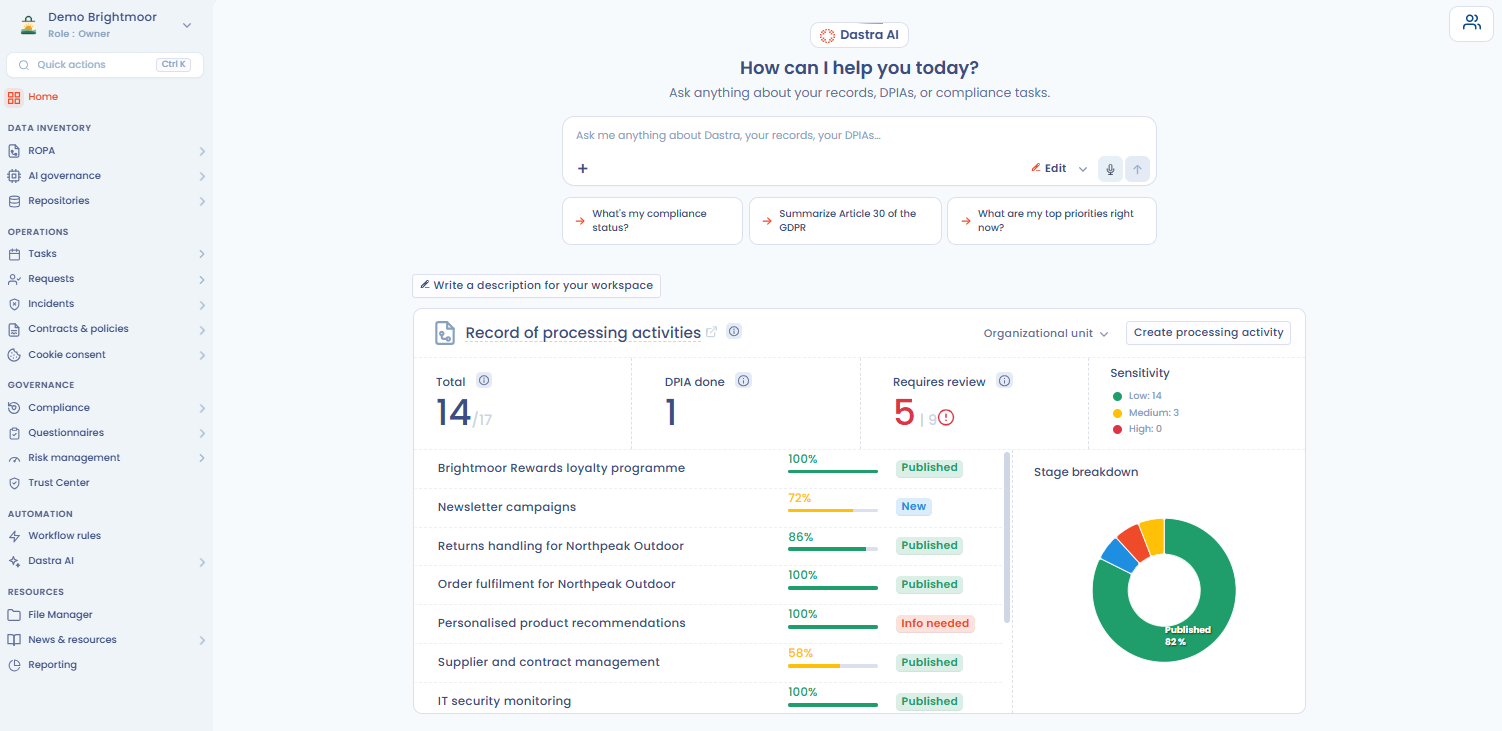 Version 3.0.0 refreshes the Dastra interface: a redesigned navigation to get to what matters faster as well as a dark theme, and new keyboard shortcuts.
A side menu organized in sections
The left side menu now groups modules into five sections, which follow the main stages of your compliance program:
- Data inventory: ROPA, AI governance, Repositories;
- Operations: Tasks, Requests, Incidents, Contracts & policies, Cookie consent;
- Governance: Compliance, Questionnaires, Risk management, Trust Center;
- Automation: Workflow rules, AI agents and artifacts;
- Resources: File Manager, News & resources, Reporting.
You pin the modules you use most by clicking the star that appears on hover: they join a Favorites section at the top of the menu. The workspace selector now sits at the top of the menu and shows your role in the current workspace. In the collapsed menu, only icons remain, submenus open on hover, and a "More..." button gathers the modules that do not fit on screen.
Dark theme
Dastra now offers a dark theme. From the menu at the top right, under "Theme", you choose between "Light", "Dark" or "System", which automatically follows your computer's settings. When Dastra switches to the dark theme to follow your system, a window lets you keep it or go back to the light theme.
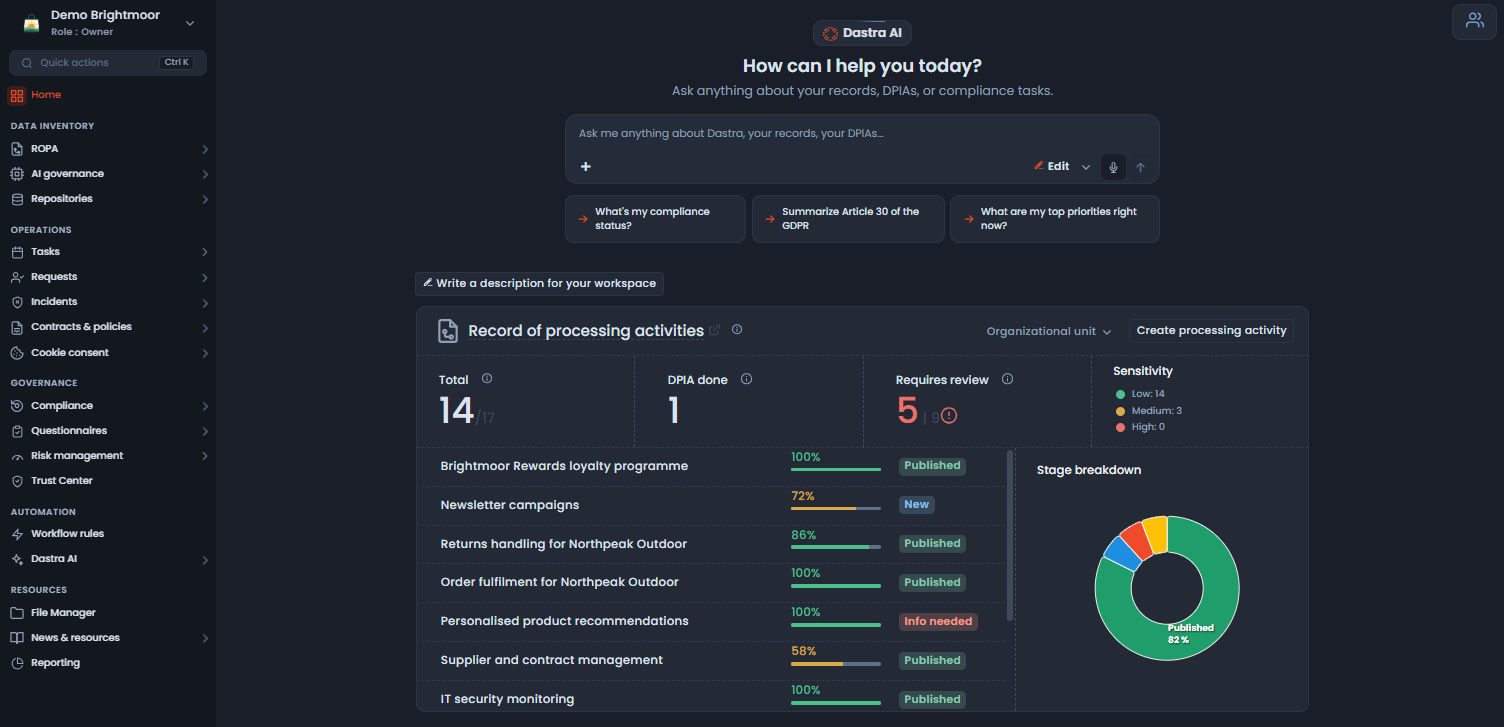 The theme choice is also offered to external questionnaire respondents and to data subjects in the requester portal.
The command palette: find everything from the keyboard
The Ctrl+K shortcut (Cmd+K on Mac), or the "Quick actions" button in the top bar, opens a command palette. A single search looks at once through the records of your workspace, the pages of the application and the Dastra documentation.
The palette also offers quick actions, depending on your permissions: create a data processing, a task, a data subject request, a contract, a data retention rule or a control point, create a data breach, create an actor.
A clearer interface, faster to browse and more comfortable during your working sessions.
Data subject right requests: requester verification by SMS to protect attachments
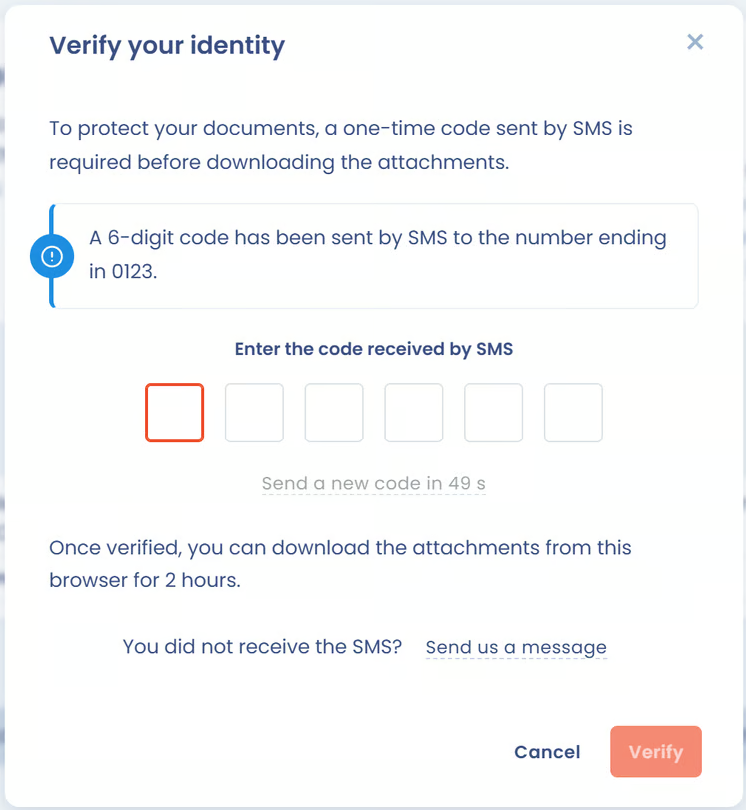 Today, the data subject accesses the requester portal with a code received by email. The security of the documents sent, which often contain personal data, sometimes sensitive, therefore rests entirely on their mailbox: if it is compromised, a third party can retrieve the data sent in response to an access or portability request.
The new Requester verification by SMS option adds a second factor, independent of email:
- when the request is created, after validating their email address, the data subject verifies their phone number with an SMS code;
- downloading attachments from the requester portal then requires an SMS code;
- a number entered or changed by a manager is never considered verified, and the former number is informed of the change.
The option is enabled in the workspace settings, then each collection form states whether it collects and verifies the number. A request without attachments triggers no SMS beyond the initial verification. The request history records every sending and every validation.
The SMS proves possession of a number, and does not on its own replace verification of the data subject's identity. This paid option is available to organizations that have subscribed to it.
Questionnaires: answer together, live
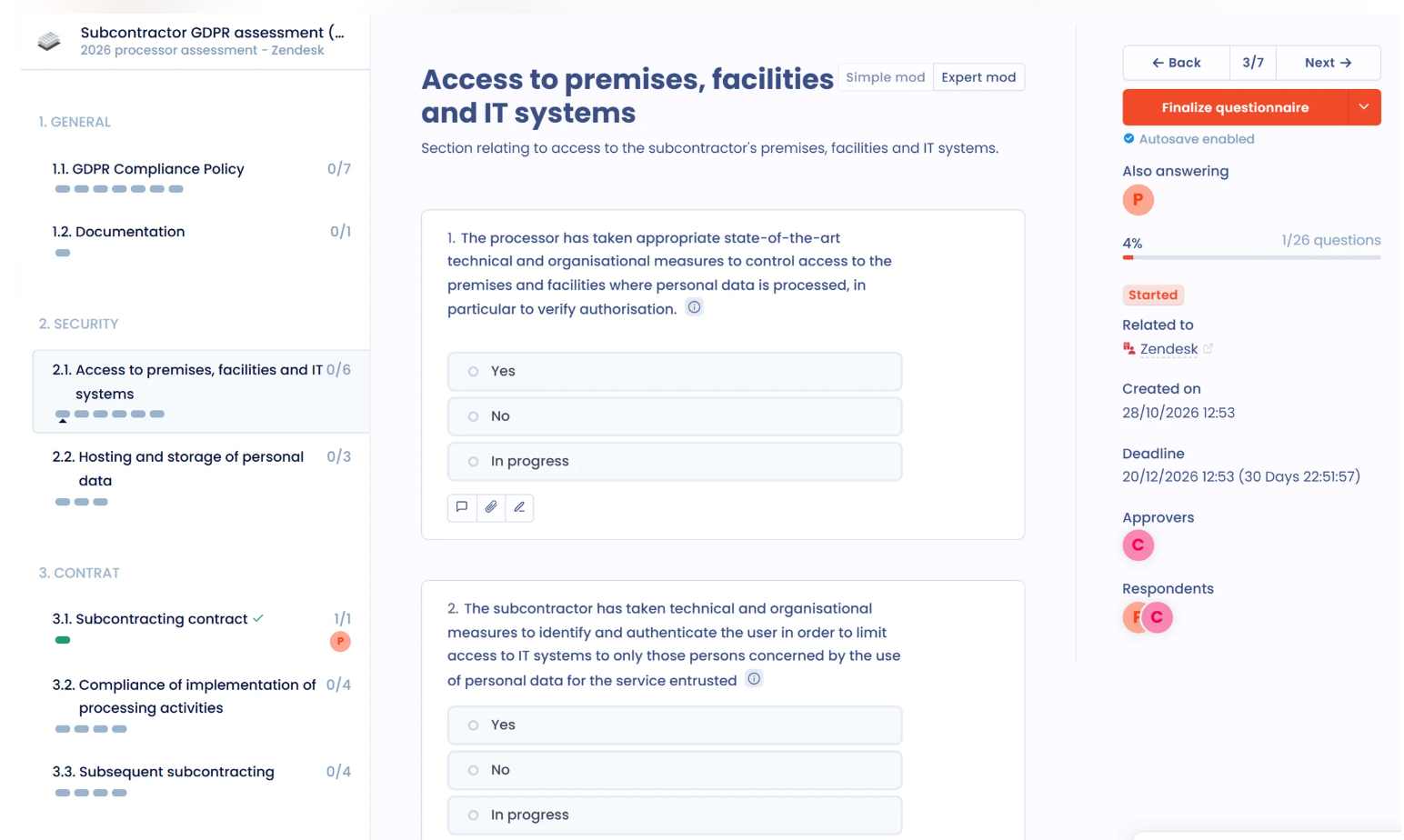 The questionnaire becomes collaborative in real time. When it is assigned to several respondents, Dastra users or external respondents, each of them follows the others' work live:
- you see who is answering at the same time as you, and which section each person is in;
- answers saved by others appear without reloading the page;
- you are warned as soon as someone else finalizes the questionnaire.
Only the respondents' name and avatar are shared: their email address is never exposed to others. Your teams move forward together, without getting in each other's way.
✨ Improvements
Organizational units: an organizational chart you can filter, export and enrich with legal information
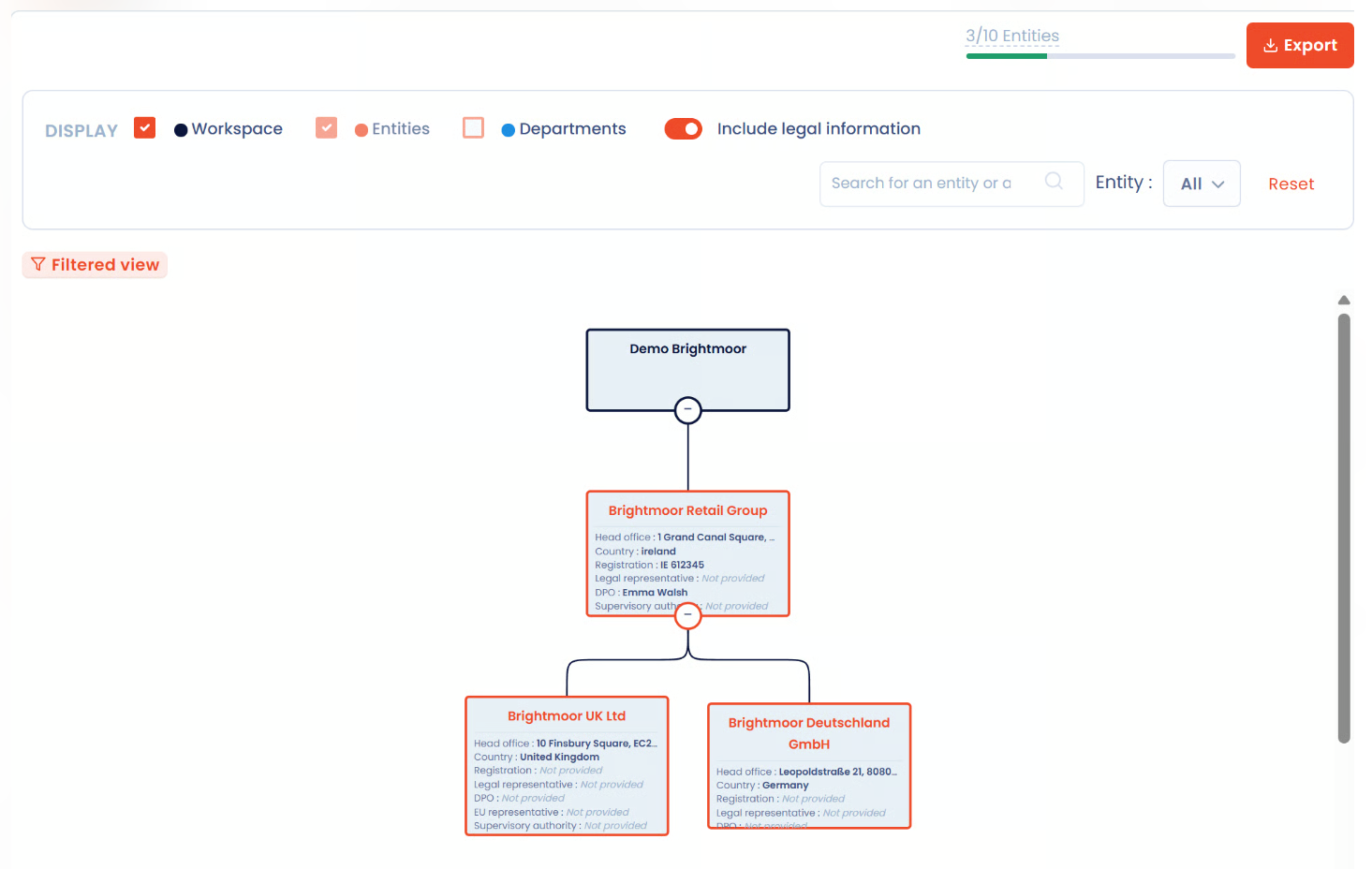 The organizational chart tab gains three capabilities, designed for groups made up of many entities and departments:
- Filter: the legend becomes a filter bar. You hide the workspace or the departments, search for a unit by name, show only one entity's branch, then return to the full view with the reset button.
- Export: the export button produces a PDF or HTML file of the chart as you filtered it, fully expanded, with its context (workspace, date, applied filters).
- Show legal information: a new checkbox adds to each entity's box its head office, registration number, legal representative, DPO, representative in the European Union and supervisory authority, with a "not specified" mention for each missing item. The export includes this information.
When a supervisory authority asks how your organization allocates GDPR responsibilities, you send a complete document, and spot beforehand the information still to be completed.
Data subject right requests and internal conversations: messages that are easier to follow
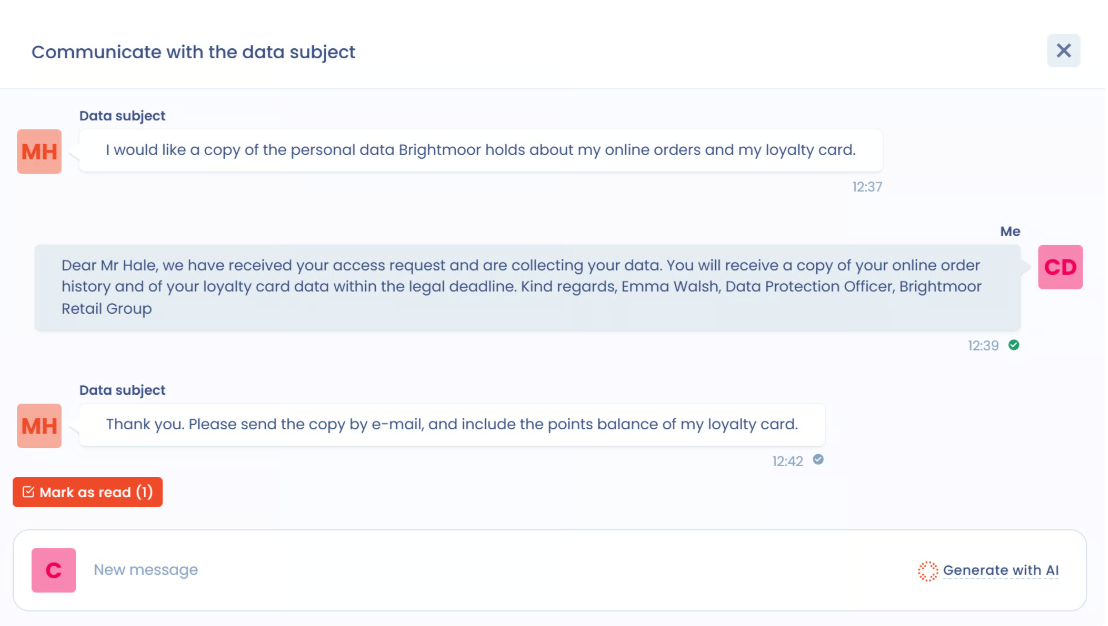 Dastra's three conversation windows (exchange with the data subject, internal conversations and requester portal) adopt a single convention, so you can see at a glance who is speaking:
- your own messages on a light blue background, others' messages on the standard background;
- the author's name above each message ("Me" for your messages, "Data subject" for the data subject);
- the date and time below each message.
In the requester portal, the organization is represented by the organizational unit of the request (name and logo): data subjects clearly identify the organization answering them, and your employees' identity stays protected.
Advanced configuration: a default timezone for the workspace
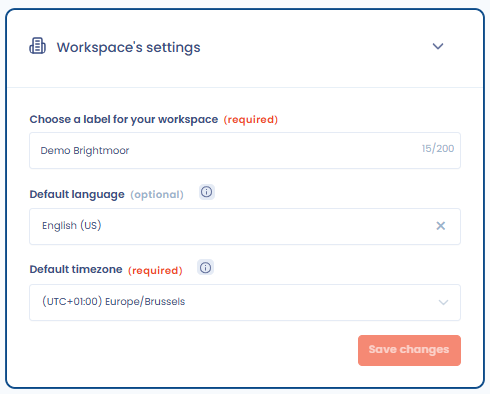 The workspace general settings now offer a default timezone, modeled on the default language. It applies to:
- the scheduled times of workflow rules, AI agents and scheduled sendings of questionnaires and audits;
- the dates in due date reminder and invitation emails;
- exports that have no timezone of their own;
- the profile of newly invited users.
Each user's own timezone still prevails for what is addressed to them personally. All members see the same time for the same rule, and your automations follow your team's local time, including when daylight saving time changes.
Other improvements
- Contracts: the status change window lets you record the move to the "Active" state as a review, from the contract edit page as well as from the Workflow column of the contracts register; the review updates the last and next review dates, and appears in the contract history.
- Record of processing activities: the new "Other" recipient category flags a recipient that is still to be qualified; it is assigned on import when no category is provided, and triggers none of the behaviors specific to business categories.
- Record of processing activities: the full format export (PDF, Word or HTML) of a processing activity only presents the data subject rights actually filled in.
- Data Mapping: the "Remarks" column of data fields is included in the complex Excel workbook, on export as well as on import.
- Trust Center: removing a document from the "Attachments" section offers the "Remove from Trust Center only" option, which keeps it everywhere else in Dastra, alongside moving it to the recycle bin.
- Questionnaires: in the review screen, each question's colored dot follows the review status set on it, whether the question is mandatory or not.
- News & resources: the "Webinars" page gives access to replays of past sessions, to watch without leaving Dastra, with a search bar shared by every section.
- Settings: in line with the data minimization principle, the "User profile" page no longer asks for a postal address or a website link, and the "Bio" field becomes "Description", with texts already entered kept.