


🚀 New Features
Dastra on Bleu: the sovereign cloud is now open to you! 🟦⬜🟥

Dastra is now also available on Bleu, a sovereign instance hosted and operated in France by Orange and Capgemini. Your data can thus be hosted in the Bleu France Central region, strictly isolated from our standard SaaS platform. The infrastructure, operated exclusively by French teams, is protected from extraterritorial access laws such as the Cloud Act or FISA.
On Bleu, you get the Dastra you already know:
- the same modules and the same versions;
- AI features, run by Mistral AI, a French company;
- connectors (Jira, ServiceNow, SAP LeanIX, DocuSign, Zapier, etc.);
- SSO (SAML, OpenID Connect);
- SCIM provisioning;
- full-text search, with an index hosted on Bleu.
Isolation is complete: databases, files, audit logs, search index, secrets and identities all belong to the Bleu instance, with a dedicated authentication server. Only our reference libraries (templates, frameworks) are synchronised to Bleu, read-only, and no customer data flows between the two platforms.
Bleu is engaged in ANSSI’s SecNumCloud 3.2 qualification, for which the process is well under way.
Your regulatory compliance thus benefits from the same level of requirements as the data it protects. The offering is described in detail on the “Dastra on Bleu (sovereign cloud)” page of the documentation.
Integrations: a Dastra root folder in SharePoint or OneDrive
When Microsoft OneDrive or SharePoint is used as file storage for a workspace, you can now designate a root folder (a “Dastra” folder, for example) from the integration configuration screen. The folder can be picked among existing folders or created on the fly. Once saved, it becomes the root of everything Dastra drops, creates and displays: generated folders are filed under it automatically (module folder, then item folder), and the Dastra document explorer stays within it.
Without a root folder, the root of the drive remains the storage location, as before. The integration labels have also been aligned to cover OneDrive as well as SharePoint document libraries.
Your compliance documents thus stay isolated and organized, with no manual reshuffling.
Integrations: task synchronization with Jira

Compliance action plans often involve teams who work in Jira every day: technical, security and support teams. Tasks created in Dastra had to be copied there by hand, and their progress tracked twice, in both tools.
The Jira connector now offers a use case dedicated to Dastra tasks. It relies on the workspace’s Jira connection and has its own configuration: project and issue type, mapping of task stages to Jira statuses, field mapping and webhook, which Dastra can register in Jira in one click.
From any task or action plan item, the Send to Jira action creates an issue in the configured project, with the task title, description, due date and priority, plus a link back to Dastra. The task and the issue then stay linked:
- the status flows both ways, between the task stages and the Jira statuses;
- the issue assignee becomes the task assignee, matched by email address;
- mapped fields are copied from Jira every time the issue changes.
Sending is available to users who have the Planning module and write access to tasks. A dedicated log traces every exchange with Jira. Finally, the task list offers new columns and filters on the integration source.
Your teams move forward in the tool they already use, while Dastra keeps an up-to-date view of your action plans.
Workflow rules: call an external API with an HTTP request
Workflow rules automate what happens inside Dastra: notifications, tasks, field updates.
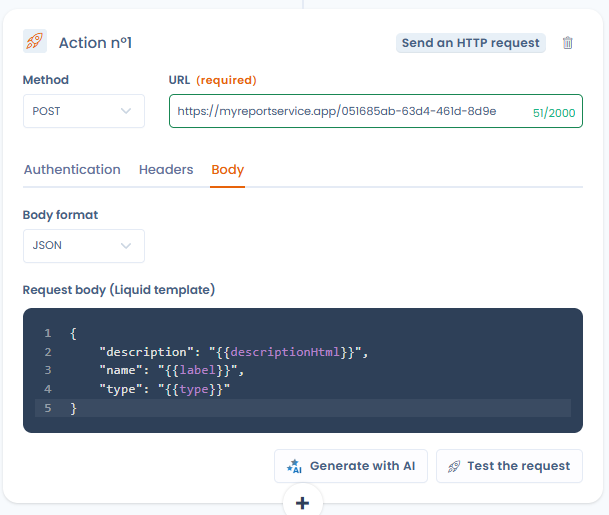
A new Send an HTTP request action lets a rule call any platform that exposes an HTTP API, at the very moment the event occurs in Dastra. It is enabled with the HTTP / Custom API integration, from the integrations catalog.
You can now:
- save connections that hold the credentials for each target platform (API key or Basic authentication);
- compose the request (GET, POST, PUT, PATCH or DELETE method, URL, headers, JSON or XML body) and insert the fields of the triggering item into it;
- preview the request rendered with the data of a real item, then send it as a test before activating the rule;
- get help from the AI assistant, which suggests a request based on your description or on an excerpt of the target API documentation.
Credentials stay in the connection and are never sent to the AI assistant, private or internal addresses are blocked, and only the outcome of each call is recorded in the rule history.
This feature lets you extend your compliance processes into your teams’ tools, without depending on a dedicated connector.
Trust center: filter the display by organizational unit
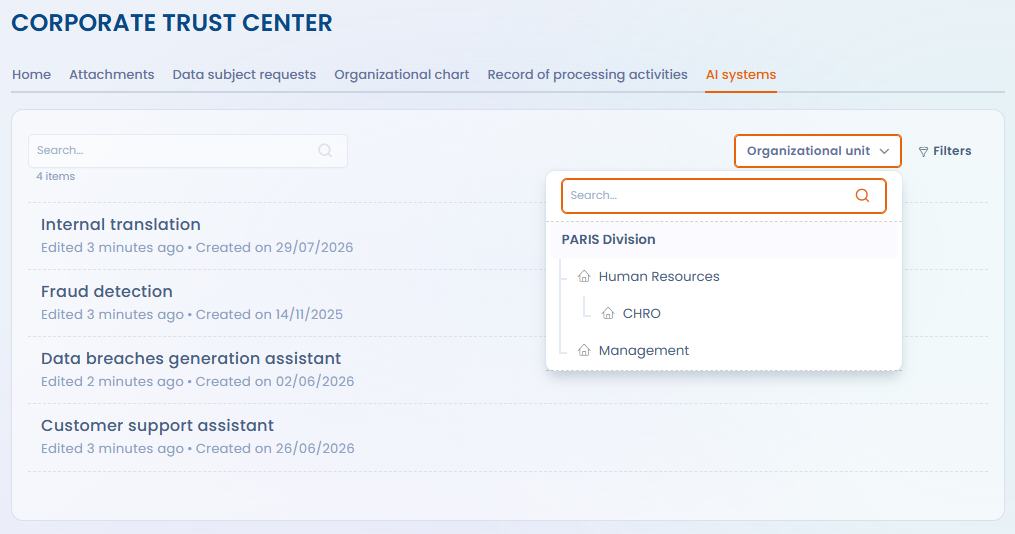
A Trust center publishes the scope of an organizational unit and of all its child units. For a group organized into subsidiaries or departments, the published register could therefore become a single list of several hundred processing activities, with no way to focus on one entity. The only workaround was to multiply portals, each with its own configuration, branding and quota.
Visitors now have a scope selector, available from every page of the Trust center. It shows the tree of published organizational units, distinguishes entities from departments, and offers a search by name. Once a unit is selected:
- the record of processing activities and the AI systems page only list the items of that unit and its child units, combined with the existing filters;
- contacts (DPOs, controllers, representatives within the European Union) are limited to the entities in scope.
The selected scope is kept from one page to the next and written into the page address: a copied link reopens the same scope. The selector only narrows the display: the published scope remains the one you configured, and nothing outside the Trust center becomes accessible.
A single portal is enough to serve customers, candidates or authorities interested in a specific subsidiary.
Questionnaires: create a template with AI from a document
Organizations often already have a written questionnaire: an internal audit grid in Word, a customer security questionnaire in PDF, a processor questionnaire sent by a client. Bringing it into Dastra meant re-entering it question by question, or reformatting it for the Excel import.
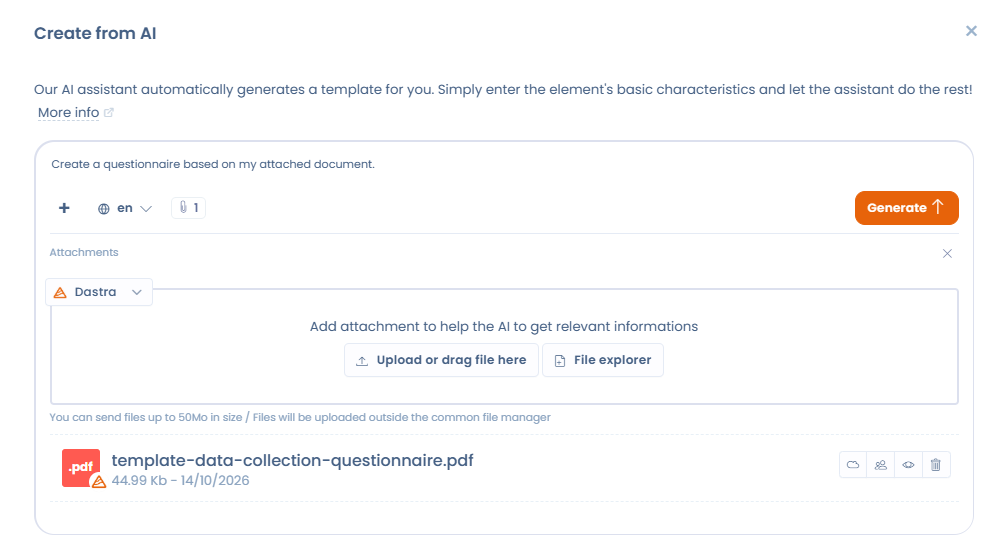
The window for creating a questionnaire template with the AI assistant now accepts attached documents, through the “+” button, like the other assisted creation windows. The assistant no longer starts from a mere topic: it transposes the questionnaire provided into Dastra’s own objects (sections, questions, question types and answer options).
The questionnaire type, the generation language and the advanced options apply as before, and you preview the result before creating the template.
Your existing questionnaires join Dastra in minutes, ready to be scheduled, tracked and scored.
✨ Improvements
Merge tool: spot differences and apply a column in one click
The merge tool compares several items field by field, whether processing activities, assets, actors, tasks, and more. Until now, nothing told an identical row apart from a diverging one, and taking the values of another column meant ticking each row one by one.
The comparison table evolves:
- each field whose value differs from one item to another carries a Different label, and the view opens on “Only differences”, with a toggle to switch back to “All fields”;
- the Select all button applies the values of a column to every diverging row in a single action, and can be undone with “Cancel selection”;
- an empty value never overwrites a filled one, and the number of rows actually updated is shown to you.
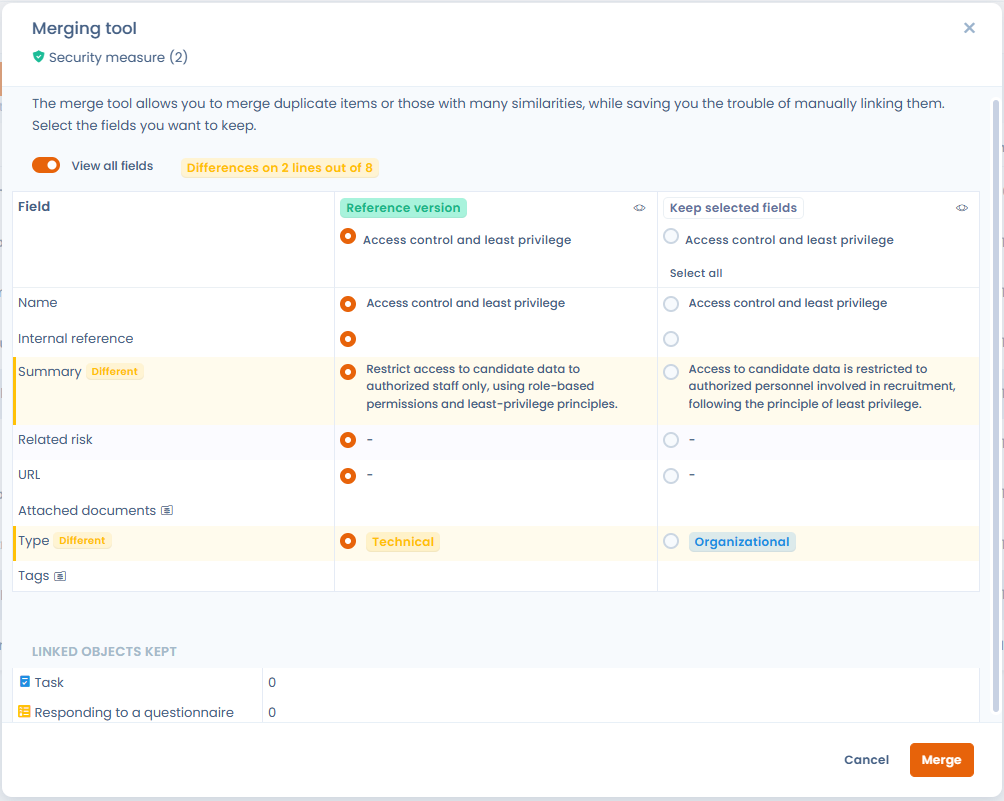
During an update from questionnaire answers, the answers column is now titled “Questionnaire answers”. The existing item always remains the reference version: it keeps its identifier, its history and its links.
You consolidate your data faster, without the risk of overwriting up-to-date information.
Questionnaires: keep the maximum score of a multiple-choice question
For a multiple-choice question, the scores of the selected answers were always added up. Some methodologies expect something else: in a DPIA, the risk level of a “Data categories” question must reflect the most sensitive category, not the sum of the selected categories.
Each multiple-choice question now offers a score calculation rule: “Sum of values” (the current behavior, applied by default) or “Maximum value”, which keeps the highest score among the selected answers. The maximum score of the question is shown below the selector, so the effect of the rule is visible immediately.
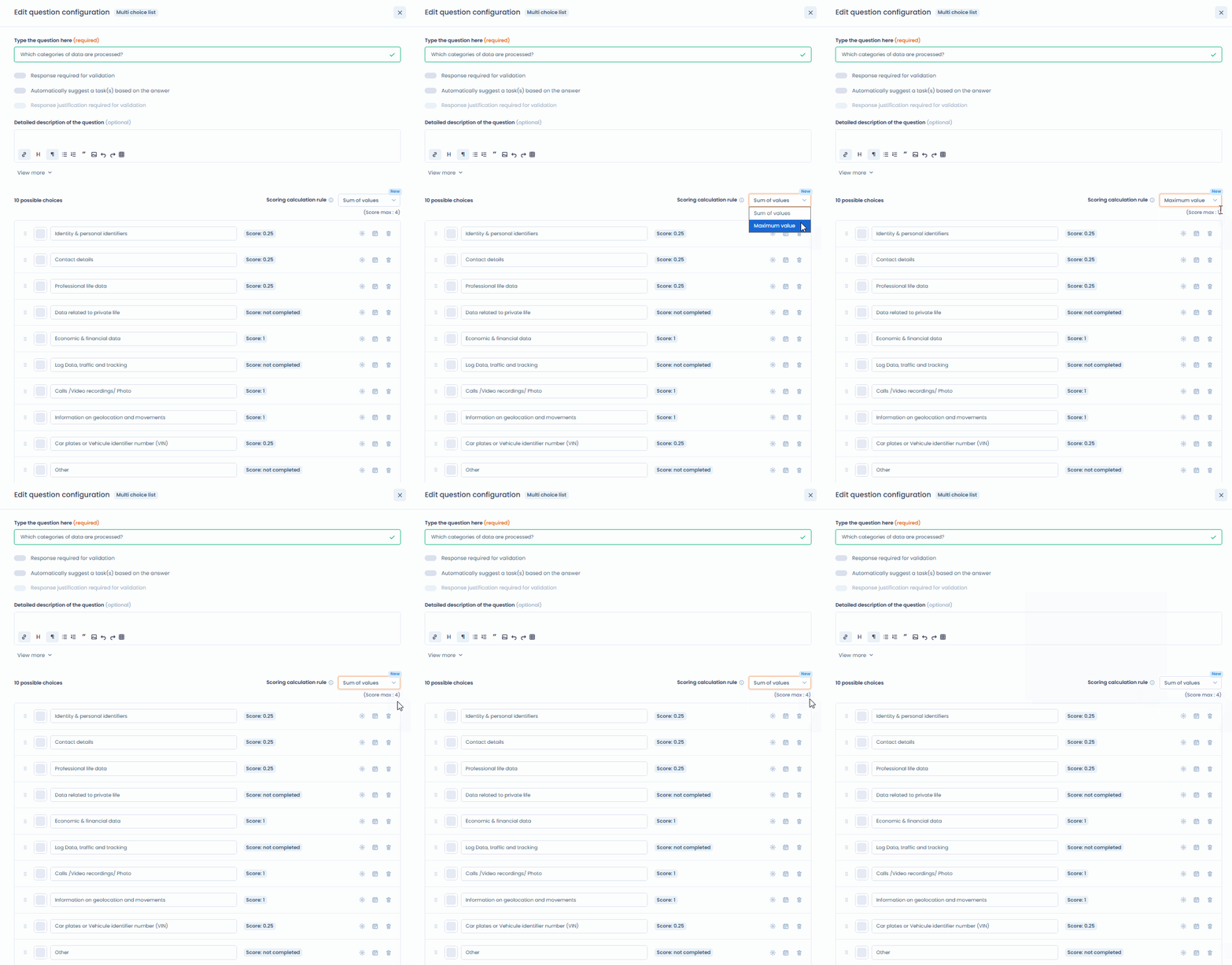
The rule carries through to the overall score, the percentage score and the score by category, and it is saved with the template.
Questionnaires: a detailed version comparison
The window comparing two versions of a questionnaire template showed both versions in full, without telling what had changed. On a long template, spotting differences by eye was unreliable.
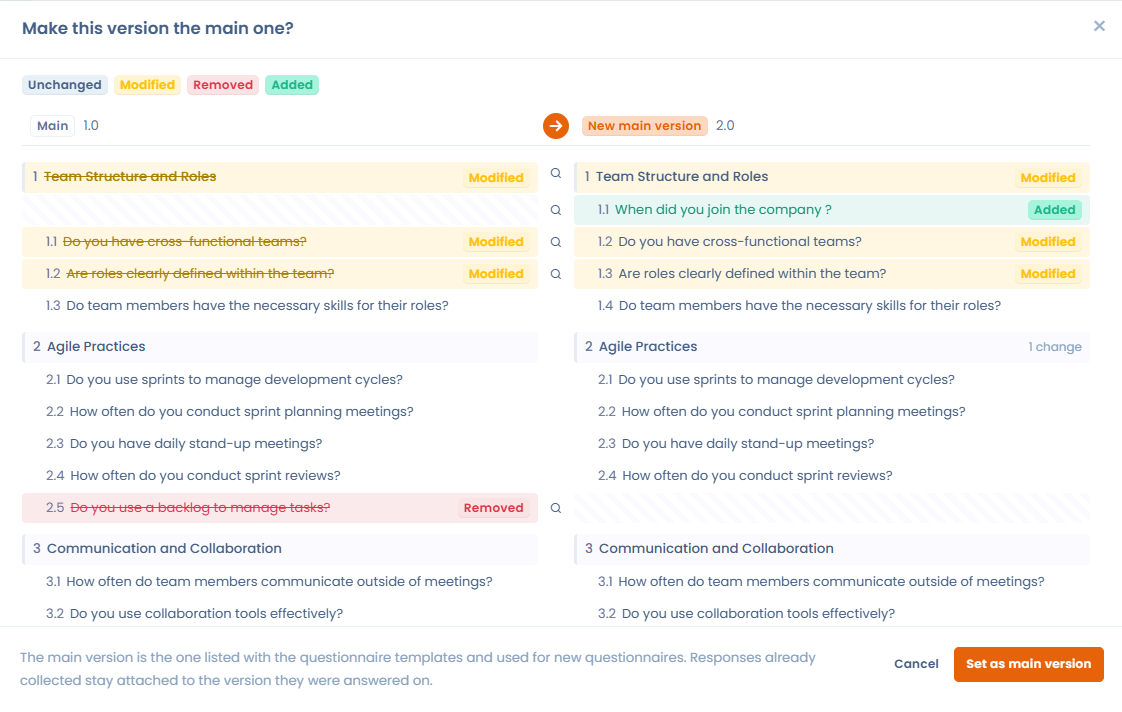
The comparison now shows both versions side by side and classifies each section and each question under four statuses: unchanged, modified, deleted or added. Differences are highlighted with a legend, and an item that was simply moved is not reported as deleted then added. A reminder of the impact on answers already collected comes with the comparison, so you can decide to overwrite or to keep the history knowingly.
Workflow rules: set the owner of the created task
A Dastra task distinguishes the assignee, who does the work, from the owner, who is accountable for it. The task creation action of a workflow rule only covered the former: every generated task arrived without an owner, to be set by hand afterwards.
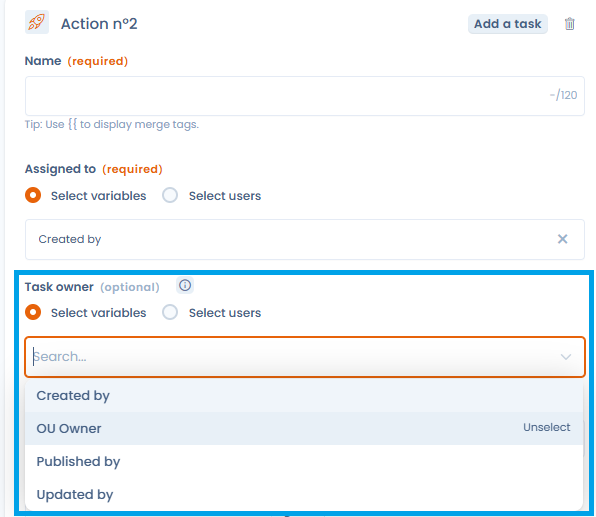
The action now offers a Task owner field, with the same selection modes as the assignee: a variable of the triggering item (its creator, owner or person in charge) or a named user. If the variable is empty, the task is still created, and existing rules keep working unchanged.
Workflow rules: assign the task to the organizational unit owner
To assign a task created by a workflow rule, administrators picked a specific user or a user field of the triggering item. The organizational unit owner was not offered, although that person is often the one who should take the task on, especially for rules about actors.
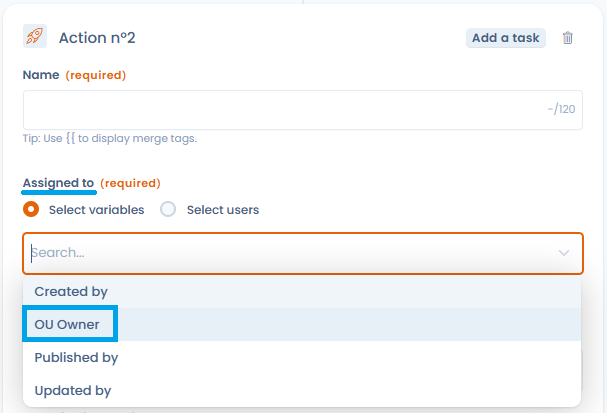
The assignee choice now offers the OU owner option, resolved at run time. It relies on the organizational unit of the triggering item and, failing that, on a default organizational unit set in the action: an item without a unit still gets an identifiable owner. If there is no owner, the task is created without an assignee, without blocking the rule.
Data subject categories: see the linked datasets
Finding out whether a data subject category was used in a dataset meant opening datasets one by one, which made any cleanup of the repository slow and tedious.
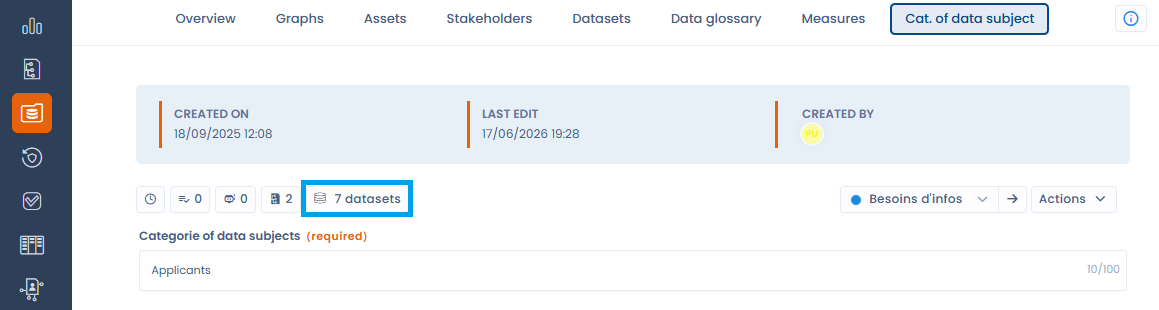
A category record now shows a counter button for its linked datasets, which opens a side panel listing them, with access to their details. In the list view, a linked datasets column (hidden by default) can be filtered, exported and imported.
A category linked to no dataset stands out at a glance: you can delete or merge it with confidence, one at a time or in bulk.
Users: owners notified when an account is created through SSO
When automatic user creation is enabled on an SSO connection, a colleague who authenticates gets a Dastra account without a prior invitation. No organization owner was told about it.
Owners now receive an email each time an account is created automatically. It states the name and address of the account created, the date and time, the SSO connection that created it, the workspace concerned where applicable, and a link to the “Users” page. You stay in control of who accesses your organization and grant the expected rights without delay.
Other improvements
- AI assistant: the guides for connecting an external AI assistant now cover Mistral.
- AI Systems: the list offers a Users column, to be enabled from “Customize columns”, which shows as avatars the users assigned in the “Stakeholders” step of each record.
- Assets: in Merge mode, the import now updates the custom fields of existing assets, an empty cell leaving the saved value unchanged.
- Data breaches: a custom field group can now be placed in any section of the breach form, including Data subjects, AI systems, Notification and Communication.
- Data subject right requests: widget display conditions offer operators suited to the field type (comparisons for numbers and dates, “is in”, “contains all”, “is empty”, and more), as in workflow rules.
- Lists: the default view of each list now follows a common column sequence (name, type, workflow or stage, owner, tags, organizational unit, status), without affecting your customized columns or saved views.
- Questionnaires:
- the save window of a template already in use clearly explains the overwrite and new version options, and a comparison is shown before any overwrite.
- from a sharing link, the email address entered is carried over to the sign-in step, and the respondent is sent straight to their identity provider when SSO is in place.
- when a questionnaire is validated, each respondent, internal or external, receives a notification email and can download their questions and answers with the “Export to PDF” action, without a Dastra account.
- the AI-assisted answer window offers a generation language selector, remembered from one generation to the next, to write answers in a language other than the interface language.
- Record of processing activities:
- the “Generate a privacy notice” window offers a language list with search, to write the notice in a language other than the interface language.
- once the AI-generated privacy notice is ready, the Export action produces a PDF, Word, HTML or Markdown file, easier to archive or to attach to your processing activity.
- beyond 200 processing activities, the JSON export runs as a background job (a notification tracks progress and the file downloads as soon as it is ready), and it now covers up to 10,000 processing activities.
- Record of processing activities and AI systems: on export, the privacy notice of a processing activity or the transparency notice of an AI system can be added automatically to the attachments of the record concerned (option enabled by default).
- Recycle bin: every move to the recycle bin goes through the same confirmation window, which reminds you that the item remains restorable, and labels now speak of the recycle bin rather than archiving.
- Regular review: in the review window, the “Reset” button becomes Delete all reviews and moves to the “Previous reviews” tab; a confirmation now details the consequences of this irreversible action.
- Workflows: a rule box now uses the full configured width of the stage, making long rules easier to read.